TileBuilder rendering engine delivering real-time, high-accuracy visuals for control room displays

TileBuilder Display Rendering Engine

Power faster decisions with TileBuilder display rendering. TileBuilder operates behind the scenes, transforming complex control room graphics into pre-rendered visual layers that load instantly and remain precise at any scale.

From Weeks to Hours: $150K Saved Every Year

Primate’s Network Model lets operators complete grid updates in 4 hours instead of 80, cutting dependency on engineers, eliminating backlogs, and typically saving over $150,000 per year in labor costs.

$150K+

annual labor savings

96%

faster update time

Real-Time Monitoring vs $6.7B Blackout

During the 2003 Northeast blackout, alarm failures left operators blind for over 90 minutes.Primate’s real-time EMS health monitoring would have caught the failure instantly, preventing cascading outages and billions in economic losses.

$6.7B

loss avoided

90+

min faster operator response

Preventing $1M-a-Day Penalties

NERC violations for missed contingencies can cost utilities millions daily. Primate continuously monitors data quality and system limits, instantly flagging potential breaches to help keep operations compliant and penalty-free.

$1M/day

fines prevented

3

key NERC standards covered

One Visualization. $100M in Mission Costs Saved

A detected anomaly nearly grounded a million-dollar launch. Primate’s visualization revealed it was outside the critical zone, preventing an unnecessary cancellation and saving hundreds of millions in wasted preparation.

$100-$150M

loss avoided

0

false aborts

Turning $1.7M Outages Into Minutes of Downtime

Average grid outages last 5.8 hours and cost $1.7M in downtime and penalties. Primate’s fault detection helps operators isolate and resolve issues fast, often restoring power in minutes instead of hours.

$1.7M

saved per outage

5.8hrs = minutes

recovery time

Stopping $300K-an-Hour Downtime Before It Starts

Each hour of downtime costs electric utilities around $300K. Primate’s continuous visualization spots anomalies before they escalate, keeping systems online, reliable, and efficient around the clock.

$300K/hr

loss prevented

24/7

intelligent alarming

High-Performance Visualization Processor

TileBuilder is the rendering foundation beneath Primate’s display ecosystem. It prepares and optimizes visual content before it ever reaches an operator screen, ensuring schematics, maps, and overlays render smoothly under heavy operational load.

By pre-processing vector graphics into optimized bitmap layers and managing how visual elements are redrawn at different scales, TileBuilder eliminates the lag, jitter, and redraw delays common in traditional rendering pipelines. The result is consistent, high-performance visuals that remain responsive even during rapid system changes.

TileBuilder accelerates data visualization with real-time processing, bitmap optimization, and efficiency

Key Benefits of Primate

Lightning bolt icon representing instant data collection for power distribution

Electric Transmission & Distribution

Aggregated data collection and processing from multiple systems to create one operating picture and full visibility.
Bar chart icon symbolizing continuous system monitoring and anomaly detection

Health Monitoring

Continuous system tracking with automated anomaly detection to maintain operational reliability.
Alarm bell icon indicating intelligent notification system for critical changes

Automated Alerts

Intelligent notification system that prioritizes and delivers critical operational updates in real time.
Checkmark icon representing clear, distortion-free display across all surfaces

Data Clarity

Validated data streams that support clear, consistent visualization across all control room displays.
Connected nodes icon symbolizing seamless integration with control room systems

Multi-System Support

Seamless integration with existing control room infrastructure, ensuring compatibility and data continuity.

See how much a control room event costs your business

Smooth Zooming and Layer Clarity

Line weights, symbols, and labels retain their integrity at every zoom level, while only the necessary visual elements refresh. The result is stable, distortion-free visuals that remain clear regardless of scale or display size.

Operators constantly move between high-level overviews and detailed system views. TileBuilder enables this by pre-rendering visual layers at multiple scale levels, allowing zoom transitions to remain fluid and readable without reprocessing entire displays.

Line conditions and tagged equipment

Maintains line clarity and symbol accuracy

Voltage levels with intelligent color-coding

Prevents label overlap or loss of readability

System anomalies and alerts

Keeps layer stacks responsive and distortion-free

Weather impact overlays

Preserves consistent visual quality

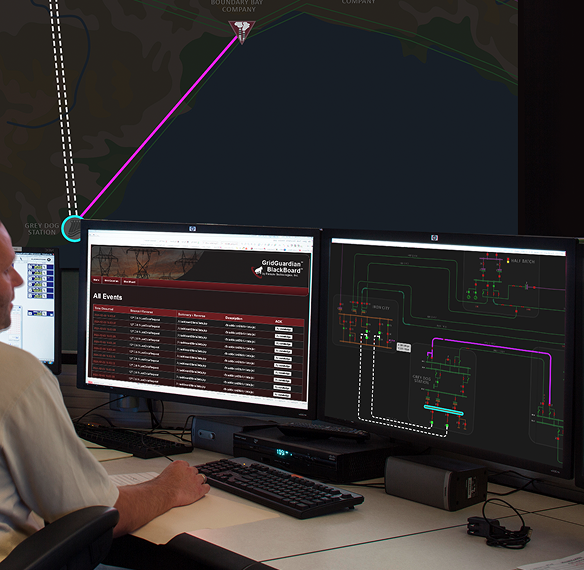
Person monitoring GridGuardian BlackBoard event and network flow displayed on dual computer screens at a control station.

Say Goodbye to Heavy Operational Load

During storms, outages, and rapid topology changes, traditional rendering engines struggle because they attempt to redraw entire displays in real time. TileBuilder avoids this by handling rendering work ahead of time.

By generating optimized bitmap pyramids and isolating visual layers, TileBuilder ensures only the elements that change are refreshed. This keeps schematics stable, prevents redraw bottlenecks, and allows displays to remain responsive even when multiple operational systems are updating simultaneously.

Engineering teams benefit from predictable performance during analysis, operators maintain uninterrupted situational awareness, and supervisors can rely on consistent visuals during the most demanding operational moments.

Explore the Full Product Suite

GridGuardian™

Mission-Critical Data Engine

GridGuardian™ is an advanced data aggregation platform that consolidates and processes real-time control room data into actionable intelligence for enhanced situational awareness and decision-making.

Learn More
Control room operator using GridGuardian software to monitor real-time system data and alerts

BlackBoard™

Display Without Limits

BlackBoard™ delivers crystal-clear visualization of control room data across multiple displays while maintaining precision and eliminating distortion at any scale.

Learn More
Control room operator using BlackBoard for real-time system visualization across multiple displays

TileViewer

Display Without Boundaries

TileViewer enables secure, multi-platform access to critical control room displays, ensuring consistent visualization from video walls to mobile devices. 

Learn More
Woman looking at desktop computer screen with product screenshot

Configuration Editor

Customize With Confidence

Configuration Editor enables real-time customization of control room displays, adapting visual elements instantly to match evolving operational needs.

Learn More
Control room operator using Configuration Editor to customize real-time display settings on multiple monitors

Explore superior display rendering via TileBuilder

Request a Demo

Frequently Asked
Questions

What is display rendering in a control room environment?
Display rendering is the process of drawing schematics, maps, and system data on operator screens in real time. High-quality rendering keeps visuals smooth, readable, and accurate as the system updates, especially during fast operational changes.
How does Primate handle heavy real-time data updates?
Primate’s TileBuilder display rendering uses selective redraws and bitmap reuse to avoid lag when system data spikes. Only the elements that change are refreshed, which keeps rapid switching events, alarms, and topology updates smooth and stable.
Does Primate really maintain clarity on both desktops and video walls?
Yes! Primate’s TileBuilder renders tiles consistently across all screens, preventing distortion when displays are scaled. Operators get identical clarity whether they’re viewing detailed schematics up close or wide geospatial views on a large video wall.
Can you improve zoom performance for complex schematics?
Primate’s TileBuilder scales vector elements intelligently, so zooming is fluid and readable at every level. Line thickness, labels, and symbols remain stable, preventing the pixelation and jitter common in slower rendering engines.
How does TileBuilder support multi-layer visuals like alarms and traces?
TileBuilder display rendering prioritizes and updates visual layers independently. Alarms, traces, tags, and overlays stay responsive without slowing down the base schematic, ensuring operators always see current conditions with no delay.
Assessment Tool

Is your control room ready for AAR and DLR?

See if your control room is prepared to support AAR and DLR across visibility, data, and operations.

Check Readiness →